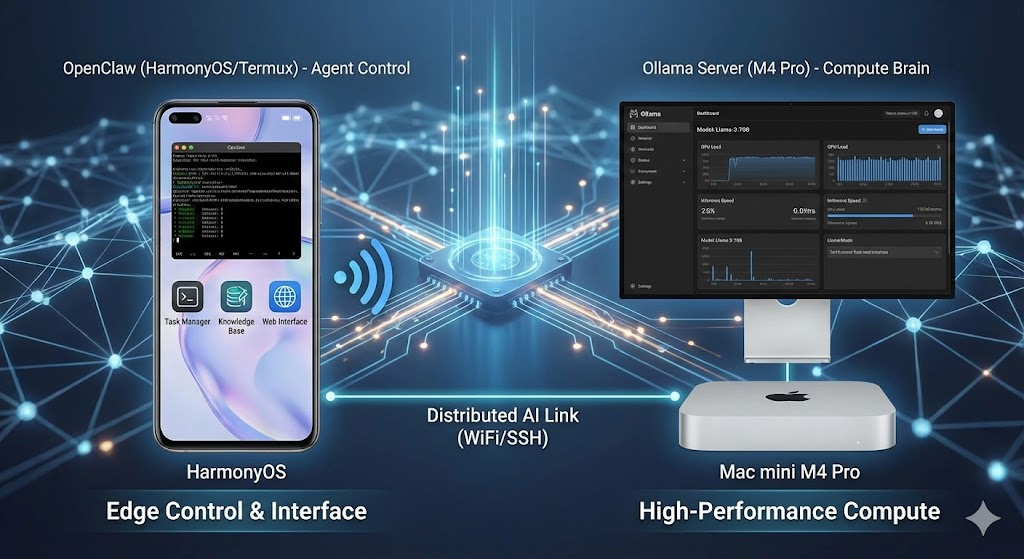
Or: How I turned an old phone into a 24/7 AI Agent server
TL;DR: We built a distributed AI system where a Huawei phone acts as the “Control Node” (running OpenClaw/Node.js via Termux & Proot-Distro) and a M4 Pro acts as the “Computing Node” (running Ollama). This architecture bypasses mobile hardware limitations while leveraging Apple Silicon’s high-bandwidth memory for fast inference.
1. Architecture Design: Edge Control + Centralized Computing Power
We ultimately adopted a “phone as the control unit, computer as the brain for computation” distributed architecture. This design effectively bypassed the limitations of the Kirin 985’s insufficient computing power and the complexities of NPU invocation.
-
Control Node (Huawei Nova 7):
- Role: Runs OpenClaw (Node.js), responsible for Agent logic, online searching, task decomposition, and web UI display.
- Environment: Android (HarmonyOS) -> Termux -> Proot-Distro (Ubuntu).
-
Computing Node (Mac mini M4 Pro):
- Role: Runs Ollama, providing LLM (Llama 3 / Qwen 2.5) inference services.
- Advantage: Leverages the M4 Pro’s high-bandwidth memory for extremely fast token generation.
2. Deployment Process
Phase One: Basic Environment Setup (Termux & Huawei Configuration)
-
Termux Installation:
- Crucially, the F-Droid version must be used to circumvent signature and update restrictions of the Play Store version.
-
Huawei-Specific Keep-Alive (Critical):
Acquire wakelock: Enable in Termux notification bar to prevent CPU from sleeping.- System Settings -> App Launch Management -> Manual management: Allow background activity for Termux.
- Multi-tasking Interface -> Lock card: Prevent Termux from being cleared by one-key cleanup.
-
SSH Connectivity:
- Install
opensshon the phone. This allows the Mac to remotely connect to the phone via terminal, eliminating the need for typing on the phone screen.
- Install
Phase Two: Runtime Environment (Proot-Distro & Node.js)
-
Introducing Proot-Distro:
- Principle: Android’s underlying Bionic Libc is incompatible with standard Linux software that relies on Glibc. Proot-Distro uses
ptracesystem calls to simulate a full Ubuntu filesystem on Android. - Operation:
pkg install proot-distro proot-distro install ubuntu - Principle: Android’s underlying Bionic Libc is incompatible with standard Linux software that relies on Glibc. Proot-Distro uses
-
Node.js Version Pitfall:
- Problem: The default Node.js version in Ubuntu’s repository is too old (< v22), preventing OpenClaw from running.
- Solution: Uninstall the
aptversion, add the official NodeSource repository directly, and install Node.js v23.
Phase Three: OpenClaw Installation and Filesystem Fixes
-
NPM Installation Error (
ENOENT):- Principle: Proot’s simulated environment has imperfect support for atomic renames and symlinks in the filesystem.
- Solution: Use the
--no-bin-linksflag to skip symlink creation:
npm install -g openclaw@latest --no-bin-links -
Manual Entry Point Fix:
- Since bin-links were skipped, the system cannot find the
openclawcommand. - Solution: Manually create an Alias in
.bashrcpointing to/usr/lib/node_modules/openclaw/dist/index.js.
- Since bin-links were skipped, the system cannot find the
Phase Four: Low-Level Compatibility Fix (The “Mock” Patch)
- Network Interface Crash (
Error 13/uv_interface_addresses):- Principle: Android’s restrictions (SELinux/permission sandbox) prevent non-root applications from accessing low-level network interface information (Netlink Socket). Node.js’s
os.networkInterfaces()call is directly rejected, leading to a crash. - Ingenious Solution: Wrote a
fix-net.jsscript to hijack and mock theos.networkInterfacesmethod, returning a pseudo-local IP. - Injection: Forced the patch to load during startup:
export NODE_OPTIONS="-r /root/fix-net.js" - Principle: Android’s restrictions (SELinux/permission sandbox) prevent non-root applications from accessing low-level network interface information (Netlink Socket). Node.js’s
Phase Five: Network Interconnection and Access
-
Mac Exposes Computing Power:
- Set
OLLAMA_HOST=0.0.0.0to make Ollama listen on the local area network, rather than only localhost.
- Set
-
Phone Connects to Brain:
- Configure OpenClaw’s
baseUrlto point to the Mac’s LAN IP (e.g.,http://192.168.x.x:11434).
- Configure OpenClaw’s
-
Web UI Access (SSH Tunnel):
- Problem: OpenClaw on the phone listens on
127.0.0.1inside the Proot environment, making it inaccessible externally. - Solution: Establish an SSH tunnel from the Mac terminal. This maps the phone’s port back to the Mac’s local machine, allowing access via
localhost:18789.
ssh -L 18789:127.0.0.1:18789 <phone_IP> - Problem: OpenClaw on the phone listens on
3. Encountered “Pits” and Technical Principle Summary
| Phenomenon/Error | Technical Principle (Root Cause) | Solution |
|---|---|---|
npm install Error ENOENT | Proot’s simulation layer has insufficient support for atomic rename operations, causing decompression/file movement failures. | Add --no-bin-links parameter to prevent symlink creation. |
| Command not found | Skipping bin link creation (as above) means no executable file is in $PATH. | Manually alias openclaw='node /path/to/index.js'. |
| SystemError: Unknown system error 13 | Android’s SELinux/permission sandbox prohibits non-root apps from reading /proc/net or using Netlink to get network card info. | Write a JS script to Mock os.networkInterfaces and pre-load it with -r. |
| Ollama Connection Failed | Ollama defaults to binding only to Loopback (127.0.0.1); for security reasons, it rejects external connections. | Set environment variable OLLAMA_HOST=0.0.0.0 on the Mac. |
| SSH Disconnect on Screen Lock | Huawei EMUI/HarmonyOS’s aggressive battery policy kills background processes or disconnects network upon screen lock. | 1. Termux Acquire Wakelock.2. System settings “Allow background activity”. 3. Use tmux to maintain the session. |
| Feishu Plugin Error | Some plugins depend on native C++ modules or specific environments, which fail to compile under Proot. | Directly delete the relevant plugin directory (rm -rf extensions/feishu). |
4. Final Achievements and Significance
You now possess a highly geeky AI development environment:
- Zero-cost Hardware Reuse: An idle Huawei mobile phone transforms into a 24/7 online Agent server.
- High-Performance Assurance: Complex inference tasks are handled by the M4 Pro, guaranteeing fast response times.
- Portability: The phone can be carried anywhere (as long as it’s on the same WiFi network), acting as a mobile “all-around assistant.”